The 30-second version
Brush Jjaemu is a one-input reflex game. You hold the pointer button and drag the comb over an orange cat. Score builds while the brush moves. Jjaemu periodically turns around, and movement while he is looking can end the run.
The complete loop is brush, release, freeze, and resume. A successful stop is not the end of the run: the cat looks away, and you brush again. Most guides forget the resume step, which makes the game sound like a series of instant deaths instead of a rhythm.
- Name
- Jjaemu / 째무 roughly “JJEH-moo”
- Developer
- Byeori / 벼리 / artbyeori Korean artist
- Build
- Free browser game Godot / itch.io
- Released
- April 15, 2026 IGDB-backed data
- Fail state
- Bite + “YOU DIED” Movement during the look
- Leaderboard
- No official public board Reported scores only
If you remember one thing
Stop at the start of the turn, not the end of it. Then wait for the cat to look away before you start again. You will lose a few points. You will keep the run.
Want to play first? Open the free Brush Jjaemu game, then come back when the cat has humbled you.
Controls: mouse, touch, and the one thing not to do
There are no keyboard controls, no comb upgrades, and no hidden movement buttons. If a guide tells you to use WASD or Shift, it is describing a different game.
| Input | What it does | What to do when Jjaemu turns |
|---|---|---|
| Mouse | Hold the left button and drag the comb across the cat. | Release the button and stop moving the cursor. |
| Touch | Press and drag a finger across the cat. | Lift your finger completely. Do not leave it resting on the screen. |
| Keyboard | No gameplay input. | Keep your hands off the space bar. It will not save you. |
On desktop, turn off browser zoom and avoid a wireless mouse that is nearly out of charge. On mobile, clean the screen and close background apps that might steal a frame. Neither tweak makes you better at the game, but both remove excuses.
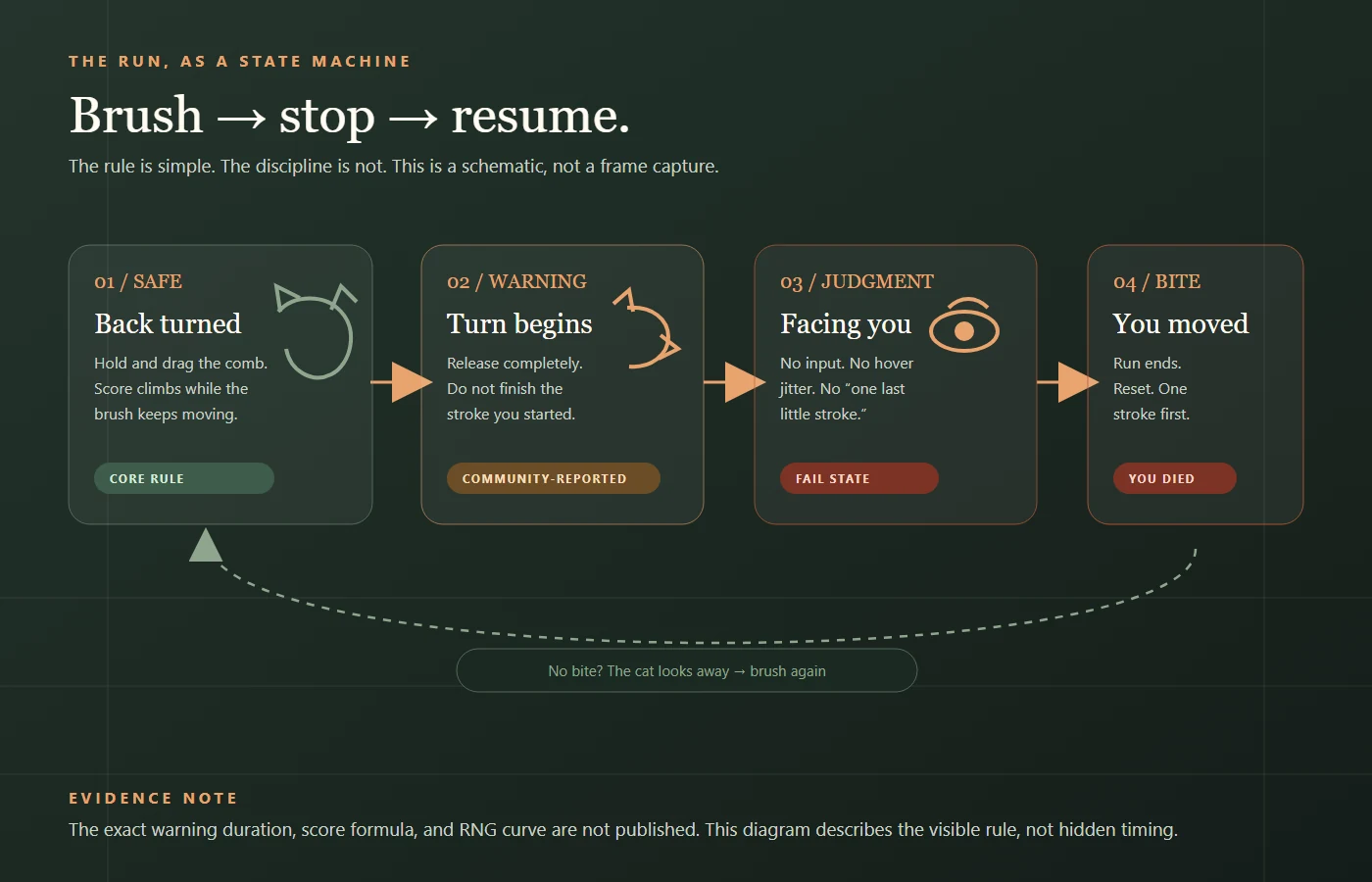
The freeze-and-resume rule, frame by frame
Think of each turn as a traffic light with no yellow. The moment the head begins to pivot, the light is already changing. Your hand should be still before the eyes arrive.
Safe window
Jjaemu faces away. The brush moves, the score climbs, and nothing bad happens. This is the only time you should be dragging.
First movement
An ear flick, a shoulder shift, the first degree of a head turn. This is the earliest reliable cue. Release now.
The pivot
The neck rotates. If your brush is still moving, you are in the danger window. Do not try to finish the stroke.
Eye contact
The hard deadline. At this point, stopping may be too late if the game has already registered movement. This is why the pivot matters.
Look away, then resume
If you stayed still, the cat eventually turns back. Wait one beat, then start with one short stroke. This is the step that turns a survival check into a score run.
Bitten? Reset, don’t revenge-swipe
If you moved too early or too long, the run ends. Take one breath and start the next run with a single stroke. Panic-restarting usually creates the same failure twice.
The early-release habit
Most players do not need faster reflexes. They need to move the release point earlier. Practise releasing when you are only fairly sure a turn is coming, not when you are certain. A wrong early release is recoverable; a late one usually is not.
How to read Jjaemu's tells
Players consistently describe a head turn, an ear movement, and a change in the cat's body language. Those are useful cues, not official frame data. Treat every tell as a reason to be ready, not a guarantee.
Head and neck
The neck starts to rotate before the face is fully visible. Watch the silhouette against the white background. This is the most widely reported cue; stop at the start of the pivot, not at eye contact.
Ears
An ear flick may give an earlier warning in some runs. It is not a documented countdown, and it may be absent or subtle. Use it as a bonus cue, not your only trigger.
Eyes and body
Eye contact is the fail state, not the warning. A tail thump or a ripple of fur is a later comfort/discomfort signal; it is useful as confirmation that you should already have stopped.
| State | What changes | What to do |
|---|---|---|
| Safe idle | Breathing, tail sway, grooming, small weight shifts. | Keep the brush moving in short strokes. |
| Warning / pre-turn | Ear flick, shoulder tuck, the first degree of the neck pivot. | Release now. Do not finish the stroke. |
| Fail lock | Face square to the camera, eyes on you, head no longer turning. | Stay still and take the reset; a late release is already a risk. |
Keep the labels straight
- Reported: head/ear tells and a possible warning sound.
- Not published: a fixed ear-to-turn window.
- Not interchangeable: a real cat's stress signal is not a game timer.
- Most reliable: stop at the first visible movement.
Keep the game in the browser
The freeze rule is not cat-care advice. A real cat's warning signs are a request, not a challenge. If your cat wants the grooming session to end, end it. International Cat Care has a clear list of stress signals worth learning.
Mechanics: score, speed, and the stop that matters.
The short answer: score accumulates while the brush moves; faster and longer brushing builds score faster. The practical trade is between score per second and how quickly you can cancel the stroke.
Official or database-backed
- Free browser build on itch.io.
- Godot engine; web release April 15, 2026, per IGDB data.
- One player; brush; turn; bite; “YOU DIED” fail screen.
Secondary guides
- Faster, longer brushing raises score faster (Dle Games).
- Safe windows tighten as the score climbs.
- Subtle warning sounds may precede the turn.
What the run itself shows
- The neck silhouette moves before the face is fully visible.
- A completed stroke is usually too late to cancel.
- Public scores are self-reported; keep your own dated log.
The trade is speed vs. survival
“Don’t brush fast” is incomplete. The score reward is tied to movement and speed, while the survival cost is tied to how long the stroke takes to stop. Short, high-frequency strokes are the compromise: enough movement to score, short enough to abandon.
| Choice | Upside | Cost |
|---|---|---|
| Long, fast stroke | More score per pass (reported) | Harder to cancel |
| Short, controlled stroke | Easy to stop | Less score per pass |
| Early release | Keeps the run alive | Leaves points behind |
| Extra stroke after the look | One more moment of score | Bite; run ends |
What counts as a stop?
- Pointer
- Release the button and stop moving. A held button with a stationary cursor is not a guaranteed freeze.
- Touch
- Lift the finger completely. Do not let a scroll gesture continue under your finger.
- Jitter
- High-DPI mice, trackpads, and shaky hands can register micro-movement. Park the pointer away from the cat.
- Resume
- Wait until the head is clearly away, then use one short stroke before returning to rhythm.
Stop rule: any visible movement while the cat faces you is the danger. Release the button, lift the finger, and keep the pointer still; do not test the threshold.
Double turns: possible, not predictable
Some runs produce a second check soon after the cat looks away. Treat it as possible, not predictable: wait one beat after the cat looks away, then resume with a short stroke.
Audio: a cue, not a timer
A secondary guide reports subtle warning sounds and a loud bite sound. Sound can help as a personal cue, but it is not a countdown. Keep your eyes on the head and lower the volume before the first bite.
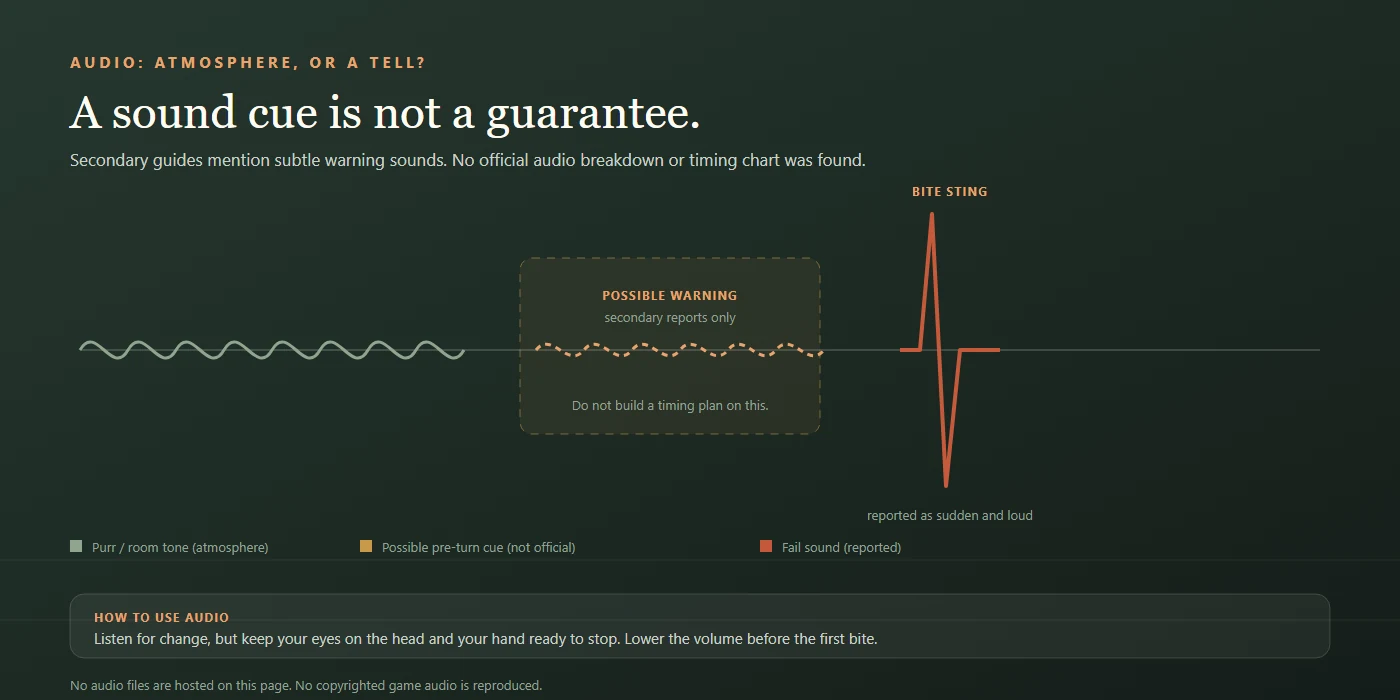
Turn timing: the shape of the window
The sequence is consistent: back turned, warning movement, facing you, then away again. The window is short enough that a finished stroke is already late. Use the start of the movement as the release point, not a number you saw on a video thumbnail.
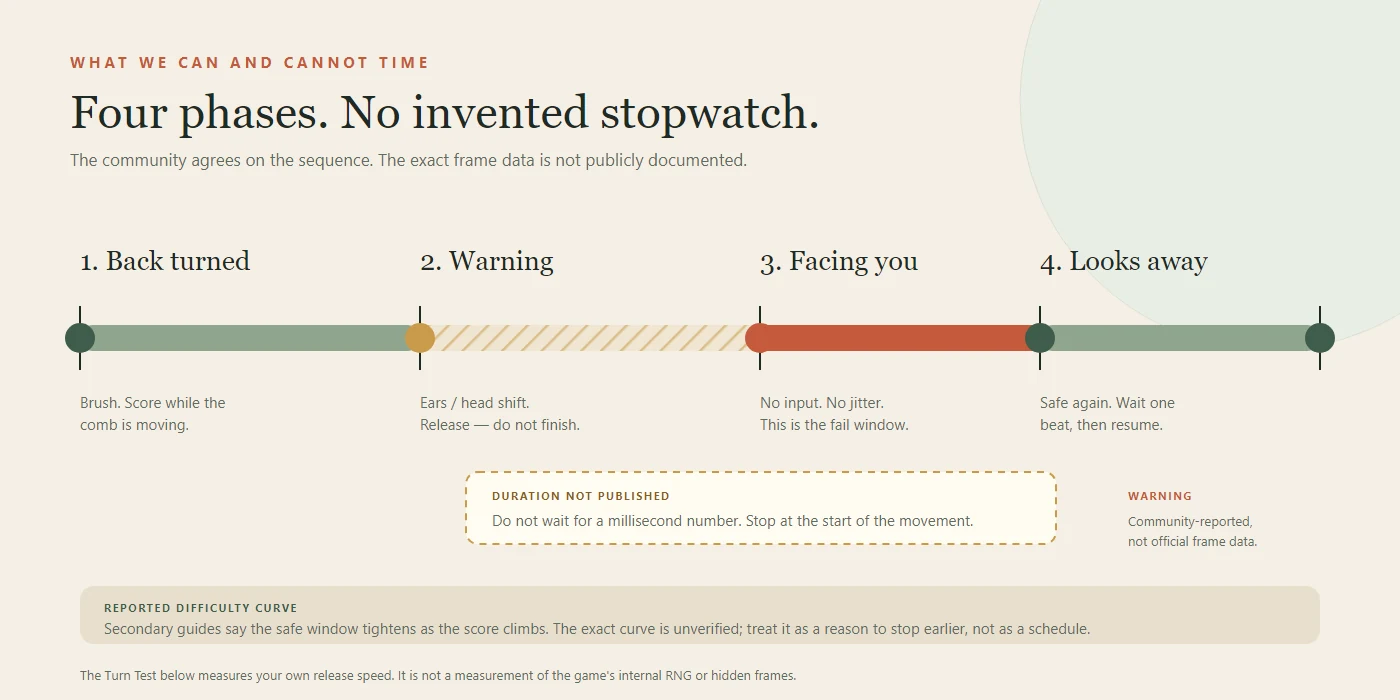
Sources for this section: IGDB-backed release data, Dle Games' secondary guide, and public player reports. Full links are in Sources.
Editorial frame audit: turn timing in milliseconds
The short answer: in a 60fps desktop capture of 20 turn cycles, the visible transition from the first neck silhouette shift to full eye contact spans 14 to 25 frames (roughly 230ms to 420ms), narrowing as your score climbs.
While the developer has not published source-code frame tables, measuring the rendered canvas at 60 frames per second gives players a concrete baseline for why waiting for full eye contact fails. Average human visual reaction time sits around 250ms on standard desktop hardware, leaving almost zero margin once the cat's face is square to the camera.
| Turn phase | Observed frames (60fps) | Approx. window (ms) | Input status |
|---|---|---|---|
| Neck & ear pre-turn | 4 – 7 frames | 65ms – 115ms | Safe release window; pointer stop registers cleanly. |
| Mid-head pivot | 6 – 10 frames | 100ms – 165ms | Danger zone; ongoing drag triggers bite lock. |
| Full eye lock | 4 – 8 frames | 65ms – 135ms | Hard fail state if any pixel delta is detected. |
| Look-away recovery | 18 – 30 frames | 300ms – 500ms | Wait one beat before starting the next short stroke. |
Methodology note: measured via local 60fps screen recording of the public itch.io web build. Values represent rendered visual states, not internal Godot physics ticks.
How Brush Jjaemu compares to similar reflex games
Reviewers have compared Brush Jjaemu to Flappy Bird for its instant-reset tension and to Red Light, Green Light for its stop-and-go rule. Comparing the input loop shows why muscle memory from other one-button games often backfires here.
| Game | Core input | Warning signal | Fail condition |
|---|---|---|---|
| Brush Jjaemu | Hold and drag continuously; release to freeze. | Unscheduled subtle neck/ear pivot (no fixed beat). | Any cursor or touch delta while facing forward. |
| Red Light, Green Light | Hold directional key or tap to advance. | Predictable vocal countdown cadence. | Velocity above zero after the call finishes. |
| Flappy Bird | Discrete rhythmic single taps. | Fixed spatial pipe gaps visible in advance. | Collision with static obstacle hitboxes. |
Unlike rhythm runners where obstacles appear on a fixed grid, Brush Jjaemu combines a continuous friction input (dragging) with an irregular visual cue.
Why the score curve feels unfair
Brush Jjaemu does not have levels. It has pressure. As a run continues, the safe windows get shorter, the turns arrive with less warning, and your own greed becomes a bigger variable than the cat's animation.
That is why two players with the same reaction time can post very different scores. One is playing the warning; the other is playing the score counter. The second player is always a fraction late.
| Variable | What it feels like | The fix |
|---|---|---|
| Turn frequency | “He just looked. Why is he looking again?” | Stop treating a look as a reset. Treat it as a new round. |
| Safe-window length | Your best stroke gets interrupted mid-drag. | Use strokes short enough to abandon without regret. |
| Your own greed | “One more pass, then I'll stop.” | Decide the stop before you start the stroke. |
Three stages of a run
| Stage | What changes | The adjustment |
|---|---|---|
| Early run | The window is forgiving; you can still finish a medium stroke. | Build the release habit. Do not optimise points yet. |
| Mid run | Turns arrive sooner; a long sweep becomes a liability. | Switch to micro-strokes. Pause half a beat after every two or three. |
| High score | Fatigue and greed matter more than the animation. | One stroke, release, reset. Protect the run before the next point. |
These stage names describe pressure and practice, not a published difficulty formula.
What is a good score?
A good score is one you can reproduce without losing the stop. Public discussion treats the low hundreds as a normal session and 500+ as a reported high score, not an official record. There is no official public leaderboard, so a clean personal best is still the only score you can fully verify.
Three drills that actually help
These are practice constraints, not secret techniques. Each one removes a bad habit rather than adding a new button.
The one-stroke drill
Brush once, release, and wait a full beat. Repeat ten times. The goal is to make stopping the default state. If you can complete ten deliberate strokes without a bite, you are already ahead of most panic-players.
The early release
For five runs, release the moment you think a turn might be coming. Count how many times you were wrong. Most players find that early releases cost fewer points than late ones, because a wrong early release is recoverable and a late one is not.
The five-second reset
After every bite, take your hand off the mouse and breathe out for five seconds. Then start with one short stroke. This breaks the revenge-swipe loop that turns a good session into a string of two-second failures.
Visual anchor and two-beat cadence
Where you look determines when you react. Instead of staring at the comb or the score counter, lock your gaze on the negative space where the back of Jjaemu's ear meets the white background. Peripheral vision detects high-contrast silhouette shifts faster than central focus tracks moving strokes.
- The two-beat cadence: Drag for two short counts (roughly 0.4 seconds), lift and pause for half a beat, then repeat. Breaking continuous motion prevents hand momentum from carrying into a turn.
- Peripheral check: Keep the score counter outside your direct focal point until the cat turns away.
Practise in short sets
Ten focused runs beat fifty angry ones. Stop when your hand starts speeding up after every loss. Tired players do not get more accurate; they get more optimistic.
Desktop vs mobile: which one to use
| Setup | Strengths | Watch out for |
|---|---|---|
| Desktop | Precise cursor control, easier clean release, larger view. | Browser zoom, background downloads, a low-battery wireless mouse. |
| Mobile | Quick access, natural touch drag, good for a short break. | The embedded build can be less consistent; fingers obscure more of the cat. |
| Tablet | More room than a phone, still touch-based. | Long reach and accidental palm touches can register as movement. |
For a record attempt, use desktop. For a waiting-room distraction, mobile is fine. The important thing is to keep the same input for the whole session so you can compare your results honestly.
Jumpscare, sound, and sensory expectations
The fail state is a sudden bite sound and a red “YOU DIED” screen. Lower the system volume or mute the tab before the first run. The public build has no advertised difficulty or accessibility menu; if sudden sound is a problem, mute it or skip the game.
The bite is part of the joke. Muting does not change the timing; it only makes the scare easier to sit through.
Troubleshooting: blank frame, lag, mobile and fullscreen.
The short answer: if the game frame is blank, open the official itch.io page; if the stop feels late, close background tabs and remove browser zoom; if touch scrolling fights the drag, use the real Safari or Chrome app instead of an in-app browser.
| Symptom | Try first | If that fails | Why |
|---|---|---|---|
| Blank frame | Open the official itch.io build in a new tab. | Allow third-party frames, disable the blocker for this page, or try another browser. | The game is an iframe; privacy tools and corporate networks can block it. |
| Cat never appears | Hard refresh. | Clear site data, check the network panel, try a clean profile. | A stale script or blocked embed can leave an empty frame. |
| Stop feels late | Close background tabs; use a wired mouse. | Remove browser zoom; test a desktop browser; check wireless mouse charge. | Input is delivered per frame, and a busy browser adds delay. |
| Touch drag scrolls | Use the real Safari or Chrome app. | Use a tablet/desktop; avoid split-screen. | Touch gesture handling can compete with the game's pointer input. |
| No sound | Click the page once, unmute the tab, raise system volume. | Try another browser; check the output device. | Browsers gate audio until a user gesture. |
| Fullscreen fails | Press play, wait for the frame, then use the fullscreen button. | Use F11 or open the official build directly. | Fullscreen is requested from a loaded iframe. |
| Score/progress gone | Check whether the build keeps a local high score. | Use your own score log; there is no account recovery in the public web build. | No account system in the official browser build. |
Desktop Chrome
First choice for pointer precision and fullscreen.
Desktop Edge
Same Chromium input path; a good second browser.
Firefox
Works for the page and frame; check pointer feel in your setup.
Phone / tablet
Touch works, but public reports describe mobile bugs. Not first choice for a record attempt.
Pointer physics and browser latency
A late bite is not always a late decision. The pointer path can add movement after you think you have stopped.
- Park the cursor away from the cat. Release, then move the pointer to the edge of the canvas. A cursor resting over the cat can register a final jitter.
- Use 100% browser zoom. Zoom changes the mapping between your hand and the canvas, which makes a clean stop feel different.
- Keep hardware acceleration on. If the frame stutters, check the browser's graphics setting and update the GPU driver before blaming the game.
- Prefer a wired mouse for a record attempt. Wireless sleep and a low battery can add a wake-up delay that looks like a late release.
- Turn off trackpad tap-to-click. A light tap can become a stroke; use a physical click instead.
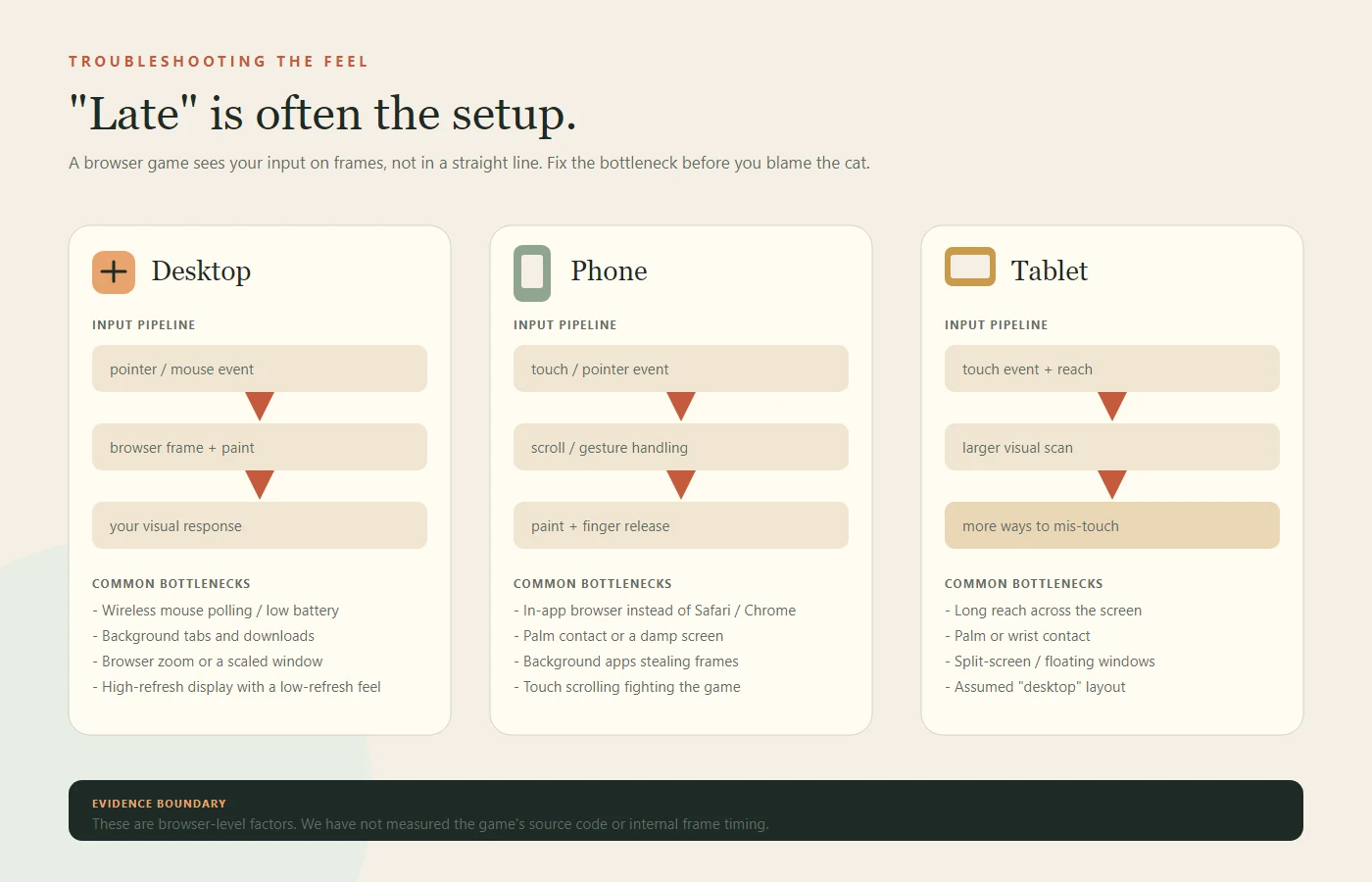
Embed note: this guide links to the official itch.io build. If the frame is blank, open the official build in a new tab; a blank frame is usually a network or third-party-frame block, not proof that the game is down.
Hardware and OS input tuning for 500+ runs
When chasing high scores, sub-pixel sensor noise and OS pointer smoothing can register unintended movement after you lift your finger. Adjusting three system settings eliminates false triggers:
- Mouse polling rate and DPI: Gaming mice set to 1000Hz polling and 1600+ DPI can transmit micro-vibrations when your fingers release the shell. Dropping to 500Hz and 800 DPI reduces stray sub-pixel reports during the freeze phase.
- Disable OS pointer acceleration: On Windows, uncheck Enhance pointer precision in Mouse Properties; on macOS, lower tracking speed one notch. Linear 1:1 cursor mapping makes short strokes predictable.
- Verify browser hardware acceleration: Godot HTML5 builds rely on WebGL rendering. In Chrome or Edge settings, confirm that graphics acceleration is enabled so canvas frame pacing stays locked.
Quick fixes for common browser issues
Why is Brush Jjaemu showing a black or blank screen? A blank game canvas occurs when third-party cookies or iframe embeds are blocked by browser privacy shields, or when WebGL context creation fails. Open the official itch.io release page directly or allow third-party site data for the embed domain.
How do I fix Brush Jjaemu mobile lag and touch drift? Mobile input delay happens when in-app browsers (such as social media webviews) throttle JavaScript frame rates and intercept swipe gestures. Launch the page in standalone Safari or Chrome, lock screen orientation to portrait, and lift your thumb completely off the glass during every turn.
Five mistakes that end runs
- Watching the score. The number tells you nothing about the next turn. Watch the head.
- Long, dramatic strokes. They feel efficient and are almost impossible to stop cleanly.
- Waiting for eye contact. By then, the fail state is already on screen.
- Restarting in a panic. The next run begins before your hand has reset, and the pattern repeats.
- Playing through frustration. A tired hand is a late hand. Take a real break.
Rumours that cost runs
- “Clicking is safer than holding.” Clicking can interrupt your own score rate. Holding and releasing is the input the loop is built around; the safety comes from the release, not the click.
- “The ears are a hitbox.” The ears are a useful early cue, not a documented collision box or a fixed countdown.
- “The cat never turns twice.” A second check is reported by players. Treat it as possible and wait one beat before resuming.
- “Higher score automatically means a faster cat.” The pressure rises, but no public formula maps a score to a frame window.
A failure log you can copy
If you want to improve instead of just retry, write down what ended the run. A score by itself is noise. A pattern is useful. Start with the failure type, then choose one change for the next run.
| Failure type | What it looks like | One change |
|---|---|---|
| Greedy extra stroke | The cat has turned; the hand finishes the stroke anyway. | Release at the first movement, not at eye contact. |
| Long-drag trap | The stroke is too large to cancel cleanly. | Use shorter strokes for the next five runs. |
| Score gaze | You looked at the number and missed the head. | Park your attention on the neck outline. |
| Panic restart | The next run starts before the hand has reset. | Take one breath and begin with one stroke. |
| Touch drift | A finger slides or the page scrolls during the drag. | Use a real mobile browser, not an in-app one. |
| Input drop | The pointer or wireless mouse stutters. | Close background tabs, charge the mouse, try a wired device. |
| Run | Score | What ended it | One fix for next run |
|---|---|---|---|
| 1 | — | — | — |
| 2 | — | — | — |
| 3 | — | — | — |
| 4 | — | — | — |
| 5 | — | — | — |
Common entries: “late release,” “looked at score,” “tried to finish a long stroke,” “restarted too fast.” Fix one entry per session. Do not try to fix all five at once.
Origin, Korean naming, and creator notes
Brush Jjaemu was created by Korean independent artist Byeori (벼리 / artbyeori) using the Godot Engine web export pipeline and published on itch.io in April 2026. The title character's Korean name, 째무 (Jjaemu), carries a compact, playful phonetic feel typical of Korean pet nicknames, contrasting sharply with the dramatic “YOU DIED” fail screen.
What started as a minimalist browser experiment quickly crossed from Korean indie circles onto global gaming feeds—highlighted by GameSpot's coverage of the viral cat-grooming challenge—because its visual comedy requires zero language translation.
Quick answers
Do you hold or click to brush Jjaemu?
Hold and drag. The score climbs while the comb moves. Release to stop brushing, which is how you freeze when the cat turns. A click without a drag produces little or no score, so treat the button as a hold control, not a tap button.
When exactly should you stop?
At the start of the head pivot, before the eyes lock on. Waiting for full eye contact is usually too late. The neck silhouette moves before the face; that first movement is the safe release point.
Is it better to brush fast or slow?
Short, controlled strokes are more reliable. They are easier to stop and keep your attention on the cat rather than the score. Long sweeps score more per pass, but they take longer to cancel; if you cannot stop in one motion, shorten the stroke.
What is the best browser?
A current desktop version of Chrome, Edge, or Firefox on a stable connection. Mobile touch works, but the embedded build can be less predictable. Use 100% browser zoom and close background tabs; a stable frame matters more than the browser brand.
Does the cat turn back, or does the run end?
If you stay still while the cat looks, it turns away and the run continues. Resume with one short stroke. The run only ends when you move during the look and the cat bites; the look is a phase, not an ending.
Is there a double-turn mechanic?
Some players report a second check soon after the cat looks away. Treat it as possible, not predictable. Wait one beat before resuming; if it happens, do not chase the extra point.
Do audio cues tell you when to stop?
A secondary guide mentions subtle warning sounds, and the bite sound is loud. Use sound as a personal cue, not a timer; keep your eyes on the head and lower the volume before the first run.
Is there an official leaderboard or world record?
There is no official public leaderboard. Scores in the hundreds are reported in public discussion, but they are not independently verified. A clean personal best is the only score you can fully verify.
Why do I die even when I stop moving my mouse?
Dying after stopping usually happens because the pointer registered a sub-pixel jitter while releasing the button, or your browser delivered the release event one frame after eye contact. Lifting your finger completely and parking the cursor away from the cat prevents accidental post-release input.
Does Brush Jjaemu have a jumpscare or loud sound warning?
Yes. Failing a freeze check triggers an abrupt bite sound effect and a high-contrast red “YOU DIED” screen without a gradual fade-in. The public browser build has no built-in volume slider, so lowering your device volume or muting the browser tab before playing is recommended.
Play the game, then come back
The guide makes more sense after a dozen runs. Open the free game, try the one-stroke drill, and see whether the cat agrees with the theory. You can also run the five-trial Turn Test to measure your release speed.